
The Local SEO Checklist: 43 Practical Checks for Your Website, Google Maps and AI Visibility
A working checklist for local businesses: fix website foundations, improve service pages, build consistent directory evidence and measure Google, Maps and AI visibility.
By local-SEO.com Editorial Team · Published · Updated · 13 min read
A website can look polished and still lose enquiries. A service page might never appear in search. A Google Business Profile might describe the wrong services. A directory might send callers to an old phone number. An AI assistant might mention the business but misunderstand where it works.
Those are different problems. A useful SEO checklist helps you tell them apart before you spend time fixing the wrong thing.
This is our 43-point checklist for local businesses and the agencies supporting them. It combines website foundations, customer-focused content, Google Maps, directories, citations and repeatable AI visibility checks. Work through it in order, then use the interactive checklist below to mark what you have reviewed. A tick means you checked something, not that a tool has verified it or guaranteed a ranking.
Before you start: collect evidence, not ticks
For each issue, note the affected page or listing, what you found, the change needed and the date you checked it. Start with the pages that generate enquiries: the homepage, contact page and main service or product pages.
Our fictional example is Maple Leaf Plumbing & Heating in Canton, Ohio. Its owner wants more relevant plumbing and heating enquiries, not simply a larger traffic graph. A customer who finds the correct water-heater repair page and calls is more useful than a visitor who reads an unrelated article and leaves.
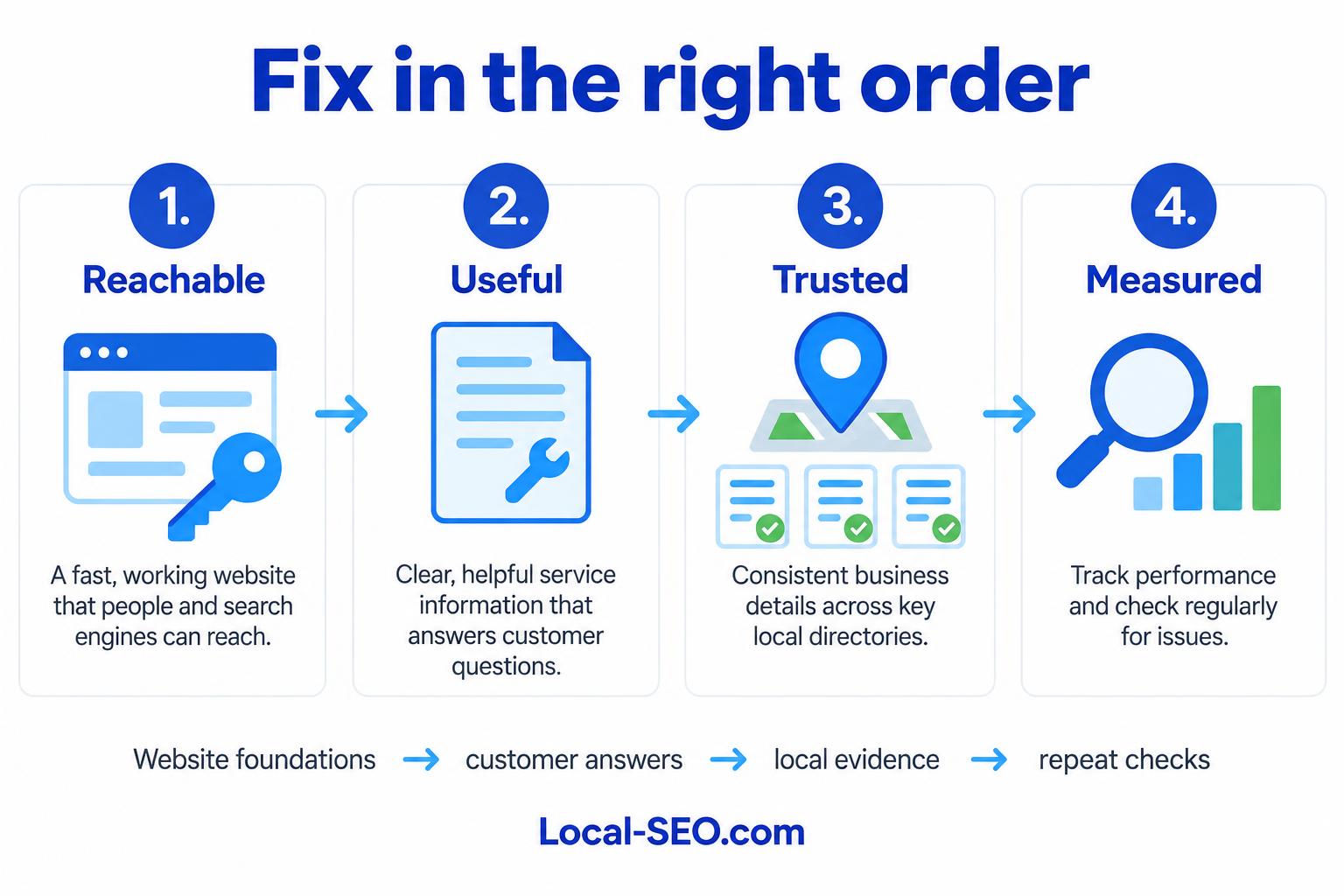
Start with access and measurement
1. Verify Search Console and Bing Webmaster Tools
Make sure the business controls its search reporting properties. Review which pages receive impressions and clicks, and use page inspection to investigate important URLs. A search impression is not a website visit. Keep those numbers separate in your reporting.
2. Measure enquiries, not just visits
Track form submissions, booking requests and meaningful contact actions. A click on a phone link is an expression of interest, not proof of a completed call or sale. Compare your website measurements with actual enquiries and avoid collecting personal information unnecessarily.
3. Configure your site's SEO controls
Your website needs a reliable way to edit page titles, descriptions, canonical addresses and indexing settings. An SEO plugin can help on some platforms, but it is not a requirement for every site and installing one does not optimize your pages automatically. Check what your existing website already provides before adding more software.
4. Review robots.txt
Check whether important public pages or resources are accidentally blocked. Robots.txt controls crawling; it does not protect private information. Use proper sign-in and access controls for confidential pages. Blocking a URL is also not a reliable way to remove it from search results.
Use our robots.txt generator to prepare rules, then review them before replacing a live file.
5. Publish a clean XML sitemap
Include the preferred addresses of public pages you want indexed. Remove broken URLs, redirects and pages deliberately excluded from search. A sitemap helps discovery but does not guarantee indexing. Review it again after a redesign or major page changes.
6. Check manual actions and security issues
Look for reported security problems and manual actions rather than assuming a ranking drop is caused by a missing keyword. A compromised website deserves attention before publishing more content. Investigate the actual notice and keep a record of the repair.
7. Confirm important pages can be indexed
Check that the page loads, does not carry an unintended noindex instruction and points to an appropriate canonical address. A site-search query alone is not a definitive indexing test. Use page-level inspection and look for the reason a page was excluded.
Choose the searches worth winning
8. List your real services and products
Start with what the business actually sells. Maple Leaf might need separate pages for boiler repair and water-heater installation because customers have different needs. Do not add services simply because they have appealing search volumes.
9. Review the businesses visible for your searches
Search competitors are the businesses showing up for the relevant query and location, not necessarily the companies the owner usually competes with offline. Record Google organic results and Maps results separately. Review the services, categories and pages supporting those appearances.
10. Separate buying searches from research questions
Someone searching for an emergency plumber has a different need from someone asking why a boiler is noisy. The first search needs a clear service page and contact option. The second may need a helpful explanation with a sensible route to professional assistance.
11. Map each topic to its best page
Choose one main page for each distinct customer need. Several variations of the same phrase can belong on one useful page. Do not create a new URL for every wording variation or every nearby town if the underlying content is identical.
12. Collect customer questions and AI prompts
Use questions from calls, emails and genuine sales conversations. Examples include: “Do you repair this boiler type?” and “What should I check before arranging a visit?” For AI visibility, record complete questions, including the location and service, so later observations can be compared fairly.
13. Check local and seasonal demand
A national search-volume estimate does not tell you how many customers are searching in Canton. Keep the geographic scope and date attached to your research. Seasonality can help plan heating content before colder weather, but an interest index is not a count of enquiries.
Make the website work
14. Use HTTPS consistently
Check that the website uses a valid certificate and that public links lead to its HTTPS addresses. Resolve insecure embedded resources. Security is a basic expectation, not a substitute for useful content.
15. Choose one preferred website address
Decide which version should be used, such as HTTPS with or without www. Align redirects, internal links, sitemap URLs and canonical tags with that choice. Multiple accessible variations deserve investigation, but their existence alone does not prove a ranking penalty.
16. Repair broken pages and internal links
Fix links that lead customers to dead ends. Restore a removed page if it still serves a purpose, or redirect to a genuinely relevant replacement where appropriate. Do not redirect every missing page to the homepage just to make the error disappear.
Try the broken-link checker before and after substantial website changes.
17. Review redirects in context
Use a permanent redirect for a permanent move and a temporary redirect for a temporary change. A 302 response is not automatically an SEO fault. Look for loops, unnecessary chains and destinations that no longer answer the original visitor's need. Our redirect checker helps inspect the journey.
18. Test your site on a phone
Read the main service pages, open the menu and submit a test enquiry. Check whether the phone number is easy to use, text is legible and forms work without sideways scrolling. A page that technically loads can still be frustrating to use.
19. Improve loading and interaction speed
Investigate oversized images, unnecessary scripts and unstable page layouts. Review mobile and desktop separately. A single lab score does not describe every customer's connection or prove how the site performs for real visitors. Use the website speed test to identify specific problems rather than chasing a perfect number.
20. Keep page addresses understandable
Use stable, descriptive URLs. Avoid changing established addresses merely to add a keyword. If a change is necessary, update the links and redirects together.
21. Make important pages easy to reach
Main services should be accessible through navigation and relevant internal links. A page listed only in a sitemap can still be hard for customers to discover. There is no magic number of clicks that guarantees rankings; aim for a clear, usable structure.
22. Add accurate structured data
Describe the business and page using facts visible to visitors. Keep business details consistent and use only relevant supported types. Structured data does not guarantee a rich result, Maps ranking or AI citation. Never invent ratings, locations or services to fill a field.
Make every page useful
23. Write distinct, descriptive page titles
A title should identify the page's real subject. “Boiler Repair in Canton” tells a visitor more than “Services.” Include the business name where it helps, but avoid repeating a list of cities and keywords. Search engines may display a different title; character counts are guidance, not a fixed ranking rule.
24. Write helpful search descriptions
Summarize what the customer will find and why the page is relevant. Meta descriptions can influence how a result reads and whether someone chooses it, but they are not a direct ranking shortcut and the displayed snippet may differ. Use our meta tag generator as a drafting aid, then check the facts.
25. Give each page a clear main heading
The heading should confirm that the visitor reached the right place. Use a logical heading structure for the sections that follow. Multiple H1 elements are not automatically a Google penalty; the practical goal is a clear reading hierarchy.
26. Answer the customer's next question
Explain what the service includes, when it is appropriate, what happens next and how to contact the business. Where prices depend on inspection, explain the factors rather than inventing a quote. A useful page reduces uncertainty.
27. Add genuine service and location detail
Describe the area the business genuinely serves and any relevant access or appointment considerations. Use original work examples only with permission. Do not pretend to have offices in towns where the business has none, or publish dozens of near-identical city pages.
28. Describe meaningful images
Write alternative text for images that communicate useful information. Decorative images generally need empty alternative text. Avoid stuffing locations and keywords into every description. Resize and compress images without making the subject impossible to inspect.
29. Link related pages together
A boiler-noise article can link to the boiler-repair service page. A service page can link to a relevant explanation or contact page. Use link text that helps readers understand the destination, not the same repeated keyword everywhere.
30. Resolve competing pages
If two pages answer the same need, review their performance, links and purpose before merging them. Sometimes they serve distinct audiences and should remain separate. A ranking fluctuation alone is not proof of keyword cannibalization.
31. Update, merge or retire outdated content
Correct obsolete facts and replace broken resources. Preserve pages that still help customers even if their traffic is modest. If you remove a page, consider whether it has a relevant replacement and avoid destroying useful information simply because it is old.
Our service-page guide goes deeper into turning a thin page into one that earns enquiries.
Build local evidence beyond your website
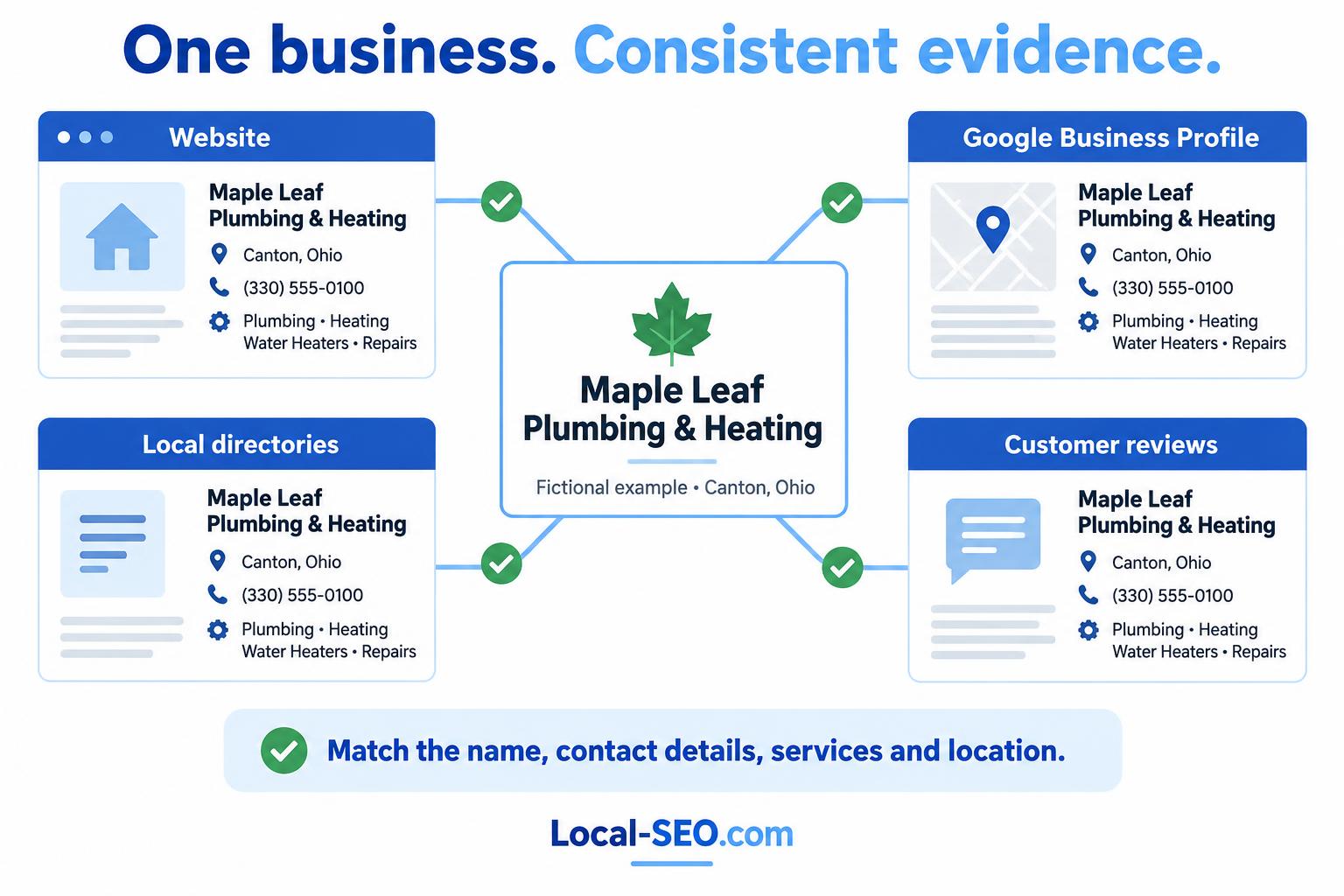
The illustration shows a fictional business, not a live client or verified listing. Its point is consistency: different sources should describe the same business, services and location. Reviews are independent customer accounts, not descriptions you should script or control.
32. Verify and maintain your Google Business Profile
Use the real trading name, accurate location or service-area setup, working contact information and current hours. Do not add keywords to the business name unless they are genuinely part of it. Service-area businesses should not expose a private home address merely to make every directory look identical.
33. Choose accurate categories, services and products
Use the primary category that best describes the business. Add other categories only when they reflect real activity. Describe services and products specifically rather than selecting everything available. Our Google Business Profile category finder can help review the options.
34. Keep business name, address and phone consistent
Maintain a reference record and use it when updating listings. Prioritize meaningful errors: old phone numbers, wrong locations, duplicate businesses and misleading names. Ordinary formatting differences, such as “Street” and “St,” do not automatically make search engines treat a listing as a different business. Consistency helps reduce ambiguity; it is not a demand for identical punctuation everywhere.
35. Join your local chamber of commerce
Start with a relevant local chamber. Membership may provide a maintained business profile, local connections and referral opportunities. Check what is included and whether the listing describes the business accurately. A chamber listing can add another credible source of business information, but it cannot guarantee a ranking or AI recommendation.
36. Choose relevant local and industry directories
Prefer directories with a genuine audience, sensible categories and maintained listings. Relevance matters more than submitting to hundreds of unknown sites. A manufacturer should consider manufacturing directories; a home-service business should consider local and service-focused listings. Check eligibility, cost and usefulness before joining. Directory submissions remain a manual decision.
37. Write descriptions that corroborate your services
NAP means name, address and phone, but a strong listing needs more than contact details. Use accurate categories and natural descriptions covering the real services, products and area. The wording can vary while the facts agree. A website describing boiler repair and a directory describing unrelated industrial equipment create a confusing picture.
Consistent, useful listings provide more sources that search engines and AI systems may use to understand and match the business entity. They can also bring direct referral traffic. None of that guarantees that an assistant will cite the listing or recommend the business.
Read our directories and citations guide for a more detailed review process.
38. Request honest reviews and respond
Ask customers for genuine feedback without offering rewards, discouraging negative reviews or filtering requests to happy customers only. Reply constructively and protect personal information. Do not tell reviewers which keywords to include or write their reviews for them.
39. Maintain useful photos and Google Posts
Use genuine, authorized photos that show the business and its work. Keep posts accurate and relevant, with a sensible next step where appropriate. More posts do not automatically mean better Maps rankings. Review what helps prospective customers decide, not just whether the profile looks busy.
40. Review relevant links and unlinked mentions
Look for local organizations, trade relationships and legitimate coverage that already mention the business. If a helpful mention has no link, a polite request may be worthwhile. Competitor backlink gaps are research leads, not an instruction to copy every link. Avoid bulk link buying and artificial schemes.
Check visibility over time
41. Record Google and Maps positions separately
Attach the keyword, location, device where relevant and date to each observation. A Maps position near the business does not describe the whole service area. Organic rankings and Maps rankings are different measurements. Compare like with like and record unavailable results honestly.
42. Establish an AI visibility baseline
Ask a small set of relevant customer questions and record the platform, question, date, business mention and any cited sources. A mention, a recommendation and a citation are not the same thing. Answers vary across systems and over time, so one response cannot establish a permanent “AI rank.”
43. Make answers verifiable, then repeat the checks
Use clear service information, accessible pages and consistent business evidence. Treat llms.txt as an optional emerging convention, not a proven route into AI recommendations. It does not replace crawl access, a good website or reliable directory information.
Repeat comparable checks after meaningful changes and connect the observations to enquiries. Improvement in a visibility metric is useful context, not proof that a particular edit caused a sale. If you need recurring AI observations, review our monthly AI tracking options. Scheduled checks use credits and require a confirmed budget; a subscription is not an unlimited-results promise.
A manageable first month
Week one: verify reporting, check the main pages can be reached and indexed, and repair broken contact journeys.
Week two: improve the most important service page. Give it a clear title, useful answers, genuine local detail and a working next step.
Week three: review the Business Profile, chamber listing and a small number of relevant directories. Correct substantive errors and align the services and descriptions.
Week four: repeat the same Google, Maps and AI questions. Compare the evidence, review enquiries and choose the next small set of fixes.
Do not tick every item once and abandon the list. Revisit it after a move, redesign, service change or significant change in visibility.
Want help deciding what to fix first?
Start with our free local SEO tools, or take the free audit-action course.
For a one-off evidence-led review, order the $29 Local SEO Audit. For ongoing checks and saved comparisons, compare the monthly tracking plans. If you want personal help working through remediation, view the $149 SEO consultation.
Use the checklist below as a working review, not as a substitute for evidence. Mark an item when you have actually inspected it, then keep your findings in your own task list or client workspace.
Keep a dated record of your next steps
Connect your checklist to rank tracking, Maps coverage, AI checks and client reporting. Choose relevant checks, compare matching evidence and review monthly plans when you need an ongoing workflow.
Your 43-point working checklist
Self-assessment, not a scan or ranking score. Selections last until you leave or reload this page.
0 of 43 reviewed · 43 remaining
About local-SEO.com Editorial Team
The local-SEO.com editorial team covers search and AI updates that affect local businesses and the agencies that serve them.
More articles
Have a story or tip? Write for us.