
How to Build Local Service Pages That Win Enquiries
A complete, practical guide to writing local service pages: search results, first-screen copy, useful answers, honest local pages and measurement, using fictional Maple Leaf Plumbing & Heating in Canton, Ohio.
By local-SEO.com Editorial Team · Published · 21 min read
A homeowner in Canton turns on the shower and gets cold water. They search for water heater repair, open a few results and try to decide who to contact.
Your page has two jobs at that moment. It needs to make its subject clear to a search engine, and it needs to help that homeowner make a decision.
A page can miss either one. It can look impressive but never explain which repairs you handle. It can repeat the service and city so often that reading it feels like a chore. Or it can explain the job well, then bury the contact button beneath a long company history.
This guide builds a better page from the search result to the final call to action. We will use Maple Leaf Plumbing & Heating, a fictional business in Canton, Ohio, and write a water heater repair page as our running example.
Every Maple Leaf page, service-area example and illustration here is fictional. There are no claimed client results, invented reviews or promises of first-place rankings. The sample copy demonstrates a method. A real business must replace it with details it can verify.
The page we are building
Our example page is for someone considering hiring a professional to repair a water heater in Canton. It is not a general article about every type of plumbing, and it is not a do-it-yourself repair tutorial.
By the time we finish, the page will have:
- A clear service, audience and location.
- A distinct title, useful description and readable URL.
- A first screen that explains the offer and makes contact easy.
- A plain-language explanation of the problem, process and limits.
- Verified proof, relevant questions and helpful internal links.
- Honest local context, without pretending to have offices everywhere.
- A simple measurement plan so changes can be judged against enquiries.
You can use the same approach for drain cleaning, furnace repair, dental treatments, photography or another genuine service. The facts will change. The questions a good page must answer are remarkably consistent.
1. Before you write: decide what the page must do
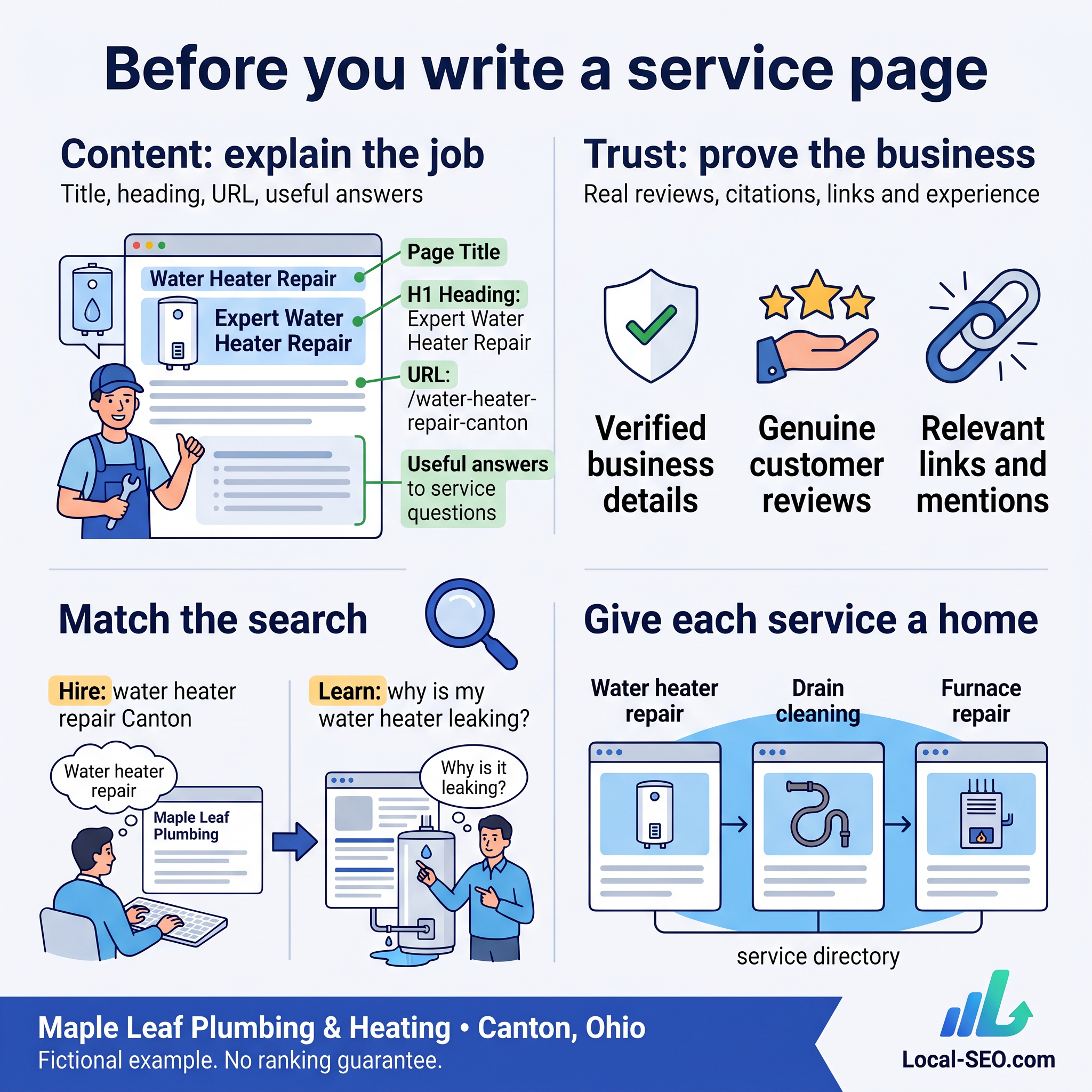
Content and trust are related, but they are not the same job
Content explains your service. Your page title, headings, text, images and links help people and search engines understand what you offer.
Trust comes from evidence. Relevant experience, genuine customer feedback, accurate business information and credible references help someone decide whether to believe you. Links, citations and reviews can also play roles in search visibility, depending on the search system and context.
Changing the words on a page does not automatically give a new business the reputation of an established one. Equally, a well-known business can make life harder for customers with a vague or confusing website.
Treat content and reputation as work that supports each other. Do not use a tidy page as an excuse to ignore your Business Profile, and do not expect reviews to explain a service your website barely mentions.
Search engines need clarity. People need a usable page.
The source material for this guide put words ahead of design. There is a useful point underneath that idea: attractive photography cannot replace a clear explanation.
But design is not irrelevant. Readable text, accessible controls, a stable layout and a page that works on a phone are part of a useful experience. A wall of technically accurate copy can still be a poor service page.
For Maple Leaf, the test is simple: can a visitor identify water heater repair, Canton and the next step without hunting through the page?
Pick a search intent before choosing a keyword
Compare these searches:
- Water heater repair Canton: likely looking for a provider.
- Water heater repair cost: comparing options or preparing to hire.
- Why is my water heater leaking?: looking for an explanation, possibly before hiring.
- How to replace a water heater element: potentially looking for a DIY procedure.
Intent is not a perfect label. Someone reading an informational answer may later become a customer. The mistake is treating all four searches as if they need the same page.
A service page should help someone evaluate and request that service. A supporting article can explain a problem in more depth, with a relevant link to the service page when professional help makes sense.
For our example, write down this brief before opening an editor:
Page purpose: help Canton homeowners ask about water heater repair.
Main question: can this business help with my problem, and what happens if I contact it?
Primary next step: request a repair.
Facts to verify: equipment handled, coverage, availability, assessment process, pricing approach and credentials.
Give distinct services enough space to be understood
A homepage can introduce a business and route people to its services. It does not have to carry every detail about every job.
Maple Leaf might need distinct pages for water heater repair, drain cleaning and furnace repair because those jobs involve different problems, equipment and customer questions.
That does not mean creating a separate page for every small wording variation. “Hot water heater repair” and “water heater repair” may belong on the same page. If two proposed pages answer the same need with nearly identical content, consider combining them.
Create a page because the service deserves a useful explanation, not because a keyword tool produced another phrase.
2. Build the search result before the page body
A visitor may encounter your title and snippet before your website. Those words should make a sensible promise about what is on the page.
Write a descriptive title, not a keyword inventory
A weak title for this page would be:
Home | Maple Leaf Plumbing & Heating
It identifies the business but says little about water heater repair.
A more useful example is:
Water Heater Repair in Canton | Maple Leaf
This is specific, readable and distinct from the title of a drain cleaning page. The full business name can appear clearly on the page itself.
You will often hear advice to keep titles around 50 to 60 characters. Treat that as an editing habit, not a Google rule. Google does not set a fixed title-character limit. Display depends on available space, and Google may generate a different title link from page information.
Put the important meaning near the beginning. Avoid squeezing five towns and six services into one title. Preview it, then read it aloud. If it sounds like a list of search terms, rewrite it.
Write a description that matches what you can deliver
Compare:
Welcome to our website. We are committed to outstanding service and customer satisfaction.
With:
Need water heater repair in Canton? Ask Maple Leaf Plumbing & Heating about your problem, the assessment process and repair options.
The second version gives a visitor more useful information. It does not invent a response time, price or guarantee.
Meta descriptions are not a direct Google ranking factor, and they do not control every snippet. Google usually builds snippets from page content and may use the description when it fits the query.
There is no fixed 150- or 160-character Google limit. A concise description is easier to manage, but clarity matters more than landing on a particular count.
Choose a URL a person can understand
A possible path is:
mapleleaf.example/water-heater-repair-canton/
The .example domain is reserved for illustrations. It is not a live Maple Leaf website.
A readable path helps communicate the topic. You do not need to cram every variation into it. If a real site already has a useful page at /water-heater-repair/, a city keyword alone is not a reason to change the address.
When changing an established URL, plan redirects and update internal links. An unnecessary move can create broken paths and measurement confusion.
3. Make the first screen answer three questions
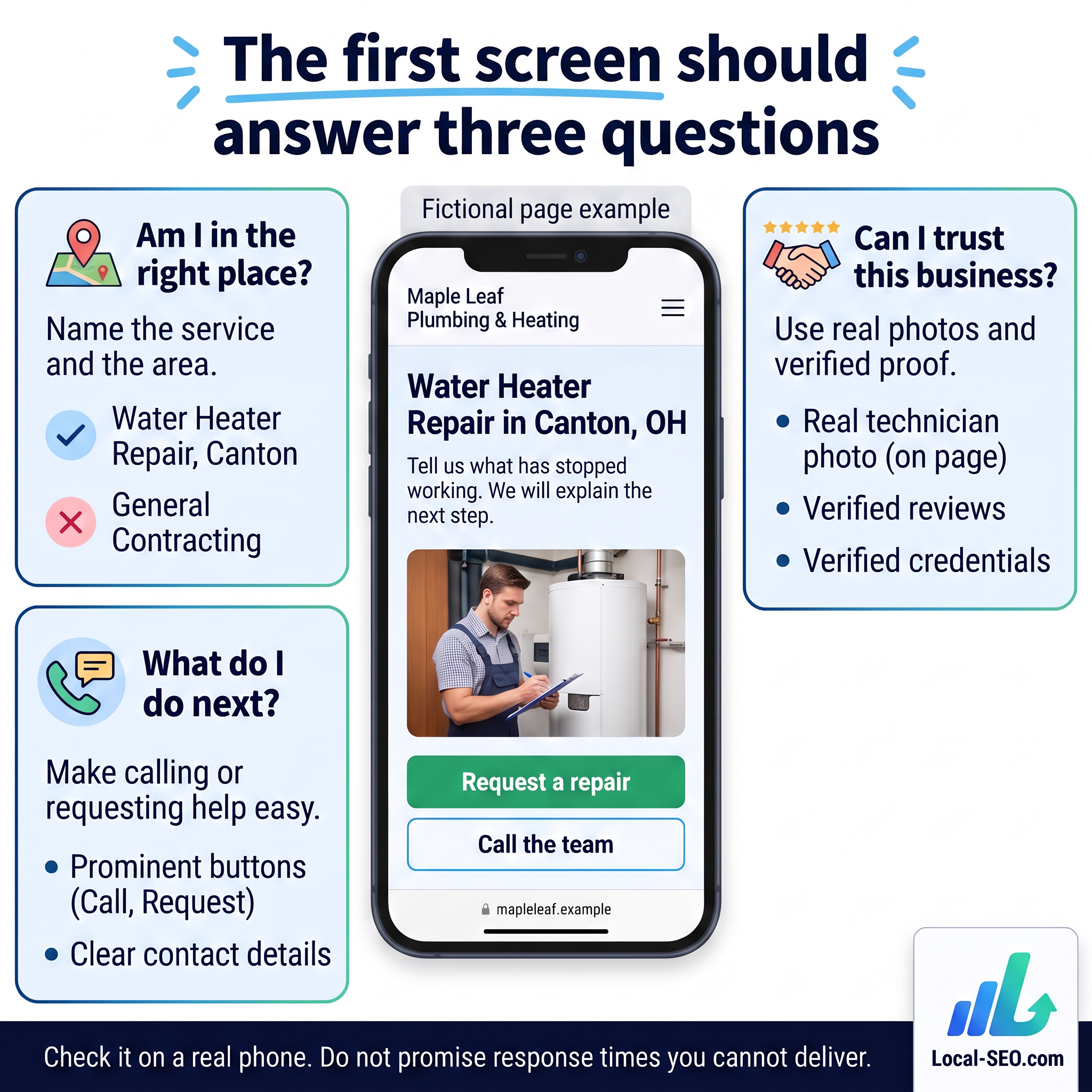
A visitor should be able to answer:
- Am I in the right place?
- Is there a credible reason to consider this business?
- What do I do next?
You do not have to squeeze the entire service into a phone screen. You do need to avoid making someone scroll through decoration before they find the offer.
Use a clear main heading
For our page:
Water Heater Repair in Canton, OH
That heading identifies the job and area. “Comfort Starts Here” might work as supporting brand copy, but it should not be the only clue about the service.
Using one obvious main heading is a sensible editorial convention. It is not a magic ranking requirement, and an H1 is not a documented single most important ranking factor. Use H2 headings for major sections and H3 headings for subsections because the hierarchy helps readers navigate.
Your title, heading and body should describe the same service naturally. They do not need to repeat an identical keyword string in every sentence.
Explain why someone should stay
A possible supporting line is:
Tell us what has stopped working. We will explain the next step.
It gives the visitor a clear expectation without making up “20 years of experience” or “same-day service.”
A real company could add a stronger differentiator if it is true: a specific type of equipment it handles, a documented assessment policy or a genuinely available booking option.
Avoid claims such as “the best in Canton” unless you can explain and substantiate them. Specific, modest proof is usually more useful than a large adjective.
Make the main action easy to find
For Maple Leaf, the primary action is Request a repair. A secondary Call the team option serves visitors who prefer a conversation.
Those choices belong to the same purpose. They are not competing offers for newsletters, discounts, downloads and unrelated consultations.
On a real mobile site, a persistent contact control can help. Check that it does not cover text, trap keyboard focus or hide the bottom of a form. Keep tap targets large enough and label the action clearly.
Test the actual telephone link and form. A handsome button that opens the wrong number is not a conversion improvement.
Booking is useful only when the business can support it
A booking calendar can reduce friction for planned appointments. It can also create false expectations for urgent work if the available slots do not represent real availability.
Do not offer a specific repair appointment when the business is only scheduling an initial assessment. Say what the booking means, who confirms it and how urgent situations are handled.
Neither a calendar nor a sticky button guarantees more leads. Treat each as a practical change to test, not a universal shortcut.
4. Write the middle of the page around the customer's decision
The middle should explain the service, remove uncertainty and help someone judge fit. It should not be a repeated version of the first screen.
Start with symptoms people recognise
A homeowner might say:
- The hot water runs out much sooner than it used to.
- There is water around the base of the tank.
- The unit makes a noise it did not make before.
- The hot water is unreliable.
A useful opening could be:
Hot water problems do not all have the same cause. Tell Maple Leaf what you have noticed, when it started and what type of water heater you have. Those details help the team explain the next step.
This avoids diagnosing the fault from a sentence on a website. It also gives the visitor something useful to prepare.
For safety-sensitive services, distinguish general information from instructions. Do not turn marketing copy into advice to handle gas, exposed electrical parts or a dangerous leak. Real emergency guidance should be reviewed by a qualified person and match local requirements.
Explain what happens after the enquiry
A process section can answer questions that a short sales pitch leaves open.
For the fictional page, the outline might be:
- Describe the problem. Share the symptoms, unit type and location.
- Confirm fit and availability. The business checks whether it handles that equipment and area.
- Arrange an assessment. Explain whether this is a visit, a call or another initial step.
- Discuss the findings. Present the available repair or replacement options after assessment.
- Agree the work. Explain approval, pricing and what happens before work starts.
This is an illustrative process, not a statement of Maple Leaf's real operations. A real business should remove any step it does not perform and explain fees before a customer commits.
Clear process copy reduces uncertainty. It does not need to claim the company has done the job “a hundred times.”
Explain what is included, and what is not
Someone comparing providers needs boundaries. Depending on verified services, the page might explain the types of units assessed, whether repair and replacement are both offered, and what information is needed before a visit.
If pricing varies, explain the factors instead of inventing a starting price. Equipment, fault, parts and scope can affect a quote. State any actual assessment fee, minimum charge or exclusion accurately.
A page that avoids every awkward detail may produce more unsuitable enquiries. That is not necessarily better marketing.
Place genuine proof near the decision
Useful evidence could include:
- An original photo of a relevant job, shared with permission.
- A genuine review that discusses the service.
- Verified qualifications or credentials where relevant.
- A short job explanation showing the problem, work and result.
- A clear warranty or workmanship policy that actually exists.
Do not invent a review to fill a design. Do not give an AI-generated technician photo a caption implying it shows your staff. The phone illustration in this article is a fictional demonstration, not business evidence.
When quoting a review, preserve its meaning and identify its source appropriately. Avoid exposing a customer's address or other private information in a case study.
5. Turn real questions into useful answers
Frequently asked questions should help someone make a decision. They should not be a place to repeat the city keyword ten more times.
Start with enquiries, not a generic FAQ generator
Ask the person who answers the phone which questions come up repeatedly. Then compare those questions with search data and relevant search-result features such as People Also Ask.
People Also Ask can suggest topics. It is not a complete record of what your customers need, and appearing in it is not guaranteed by adding an FAQ.
For our water heater page, useful questions might include:
- Do you assess both tank and tankless units?
- What details should I provide when requesting a repair?
- How do you decide whether repair or replacement makes sense?
- Is there an assessment charge?
- Which areas do you serve?
- What does booking an assessment commit me to?
Each answer needs business-specific facts. If the writer does not know the fee or equipment coverage, mark it for verification instead of guessing.
Give a direct answer before the explanation
For example:
What should I send with my enquiry?
Describe the problem, when it began and the type of water heater you have. If the business requests a photo, take it only where it is safe to do so. The team can then explain whether it can help and what assessment is needed.
The answer is readable, useful and limited. It does not promise to identify a fault from a photograph.
Add tools only when they make the decision clearer
A calculator or checklist can be helpful if the inputs and assumptions are sound. A misleading cost calculator is worse than a plain explanation that says a quote requires an assessment.
For this example, a simple enquiry checklist may be more useful than an automated repair-price estimate. Explain what the tool can and cannot establish, and review anything that affects safety or financial expectations.
6. Connect the page to the rest of the website
A service page should not be a dead end.
Link from a services overview to the repair page. Link from a genuinely related problem article when the repair service is a useful next step. Link to a replacement page where that option is relevant, without implying replacement is always necessary.
Use descriptive link text such as water heater replacement options rather than click here. Keep the surrounding sentence natural.
Avoid linking every service phrase to a different page. A visitor should be able to understand why the link is there.
Before publishing, check that the important service page can be reached through normal navigation and that links work. A page can exist in a sitemap while remaining hard for customers to find.
7. Create local pages only when they offer local value
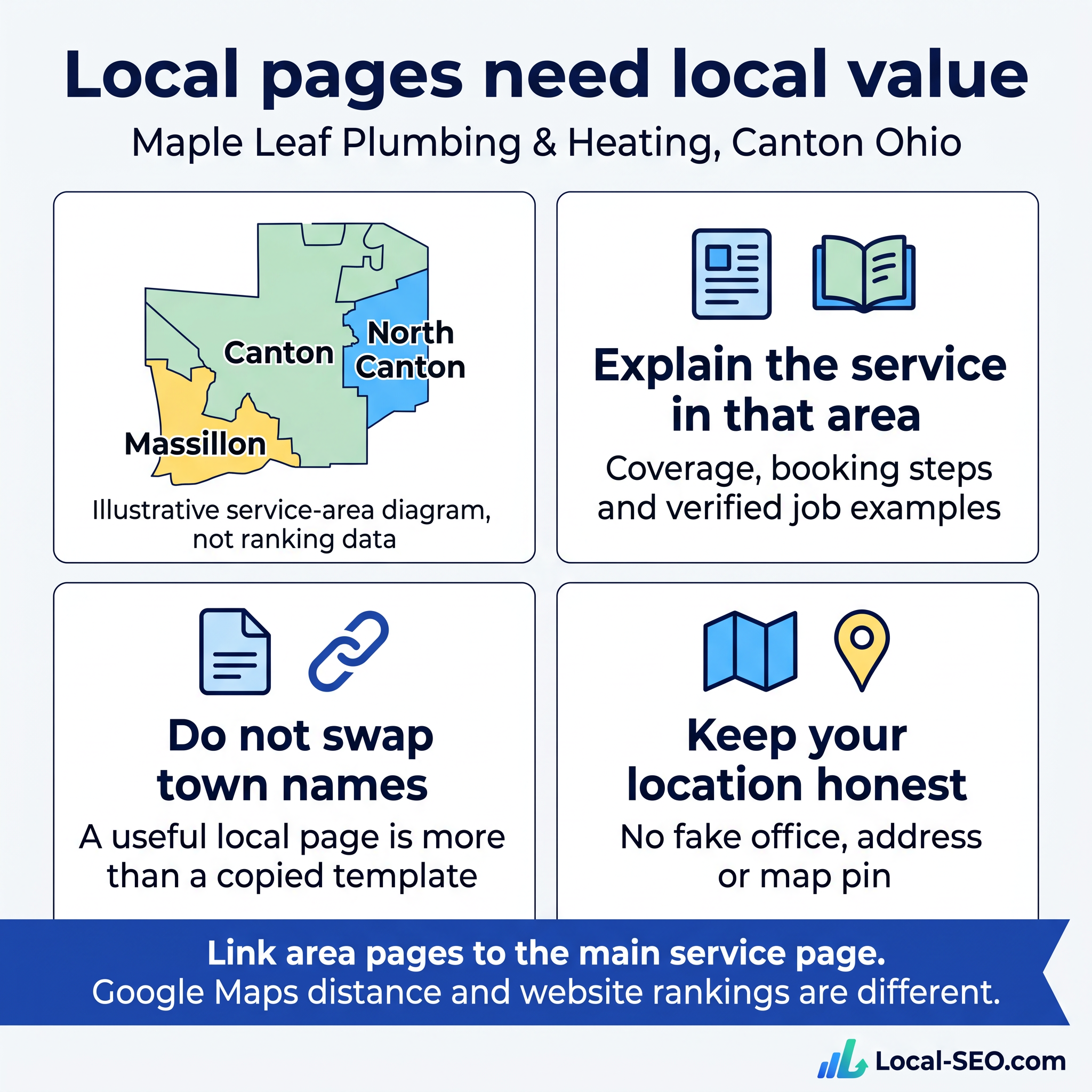
It is tempting to create one page for every town around a business. Resist that as a default production plan.
Google Maps visibility and organic website rankings are different systems. Google describes local results in terms of relevance, distance and prominence. A new town page does not move your business closer to a searcher or establish an office there.
Ask whether the page helps someone in that area
For fictional Maple Leaf, North Canton and Massillon illustrate nearby places. They are not a statement of actual service coverage.
A useful real area page might explain:
- Whether that area is genuinely served.
- How booking or coverage differs there, if it does.
- Relevant job examples, with permission and verified details.
- Specific customer questions that the main page does not answer.
- Links to the main service explanation and contact process.
A place name or landmark is not valuable simply because it is local. Include a detail when it helps explain the service, not as decoration for a search engine.
Do not create fake offices or decorative map pins
An embedded map can help a customer understand a real location. It does not create legitimacy for a business that is not located there.
Keep website location information aligned with reality. Do not suggest there is a staffed office in every target town. A service-area business should describe coverage honestly and follow the relevant Business Profile rules.
Avoid thin, interchangeable pages
If twenty pages differ only in the town name, ask why someone would need all twenty. Pages created mainly to target similar queries and funnel visitors to the same destination can cross into doorway abuse.
Sometimes one strong service page with a clear coverage section is the better answer. Sometimes a distinct local page is justified. The deciding factor should be user value, not a page-count target.
Translate for people, not for a checkbox
If your real audience needs another language, consider professionally reviewed translations of key service and contact information. Make sure the business can communicate with people using that language.
Do not promise that translated pages face less competition or will rank more easily. Translation is first a customer-service decision. Technical details such as separate URLs and appropriate language annotations need careful implementation.
8. Use AI to organise the work, not invent the business
AI can help build an outline, group questions and turn rough notes into a first draft. It cannot supply facts your business has not given it.
Collect the facts first
Before drafting, gather:
- The exact service and equipment covered.
- The areas genuinely served.
- The enquiry and assessment process.
- Actual availability and pricing policies.
- Verified credentials, guarantees and proof.
- Common questions from customers.
- Relevant original photographs and permissions.
Without that material, a model may fill the gaps with plausible claims. Plausible is not the same as true.
Give the draft a strict brief
A useful instruction is:
Draft a water heater repair service page for a fictional Canton plumbing business. Use only the supplied facts. Mark missing information as [VERIFY]. Do not invent prices, qualifications, response times, reviews, years of experience or results. Explain the customer's next step in plain language.
For a real business, supply approved facts rather than substituting a client's private information without permission.
Review every claim, including the small ones. “Fully insured,” “all makes and models” and “available around the clock” are business statements, not harmless filler.
Helpful content rules still apply
Google does not prohibit content merely because AI assisted with it. Its guidance emphasises useful, accurate material, and its spam policies cover scaled content made primarily to manipulate rankings without adding value.
Changing a few words in a generated template does not automatically make a page useful. The final page needs a reason to exist and a person responsible for its accuracy.
Separate Google AI features from chatbot visibility
Established SEO practices remain relevant to Google's AI search features. That does not mean a high Google rank guarantees inclusion in an AI Overview, or that ChatGPT, Claude, Gemini and Perplexity all select sources the same way.
Clear answers and credible business information are sensible foundations. If AI recommendations matter to your business, measure them separately with recorded questions, dates, answers and sources. An answer can change between runs.
Local-SEO.com offers AI Visibility tools for checking recorded answers and sources, alongside website and ranking tools. Read the to understand the differences. No tool can guarantee an assistant recommends a business.
9. A worked Maple Leaf page, top to bottom
Here is a compact example showing how the pieces fit. It is deliberately unfinished where real business facts are required.
Search result setup
Title: Water Heater Repair in Canton | Maple Leaf
Description: Need water heater repair in Canton? Ask Maple Leaf Plumbing & Heating about your problem, the assessment process and repair options.
Example URL: mapleleaf.example/water-heater-repair-canton/
First screen
Main heading: Water Heater Repair in Canton, OH
Supporting copy: Tell us what has stopped working. We will explain the next step.
Primary action: Request a repair
Secondary contact option: Call the team
Proof: [Add a verified credential or genuine service-specific review.]
Problem and service explanation
No hot water, unreliable temperatures or a leak can leave you unsure what to do next. Describe the symptoms and your equipment when you contact Maple Leaf. The team can explain whether the job is within its service coverage and what assessment is needed.
Verification note: This paragraph assumes the business uses that enquiry process. Confirm it before using the copy.
What happens next
Share the problem and your location. The team confirms service fit and availability, explains the assessment arrangements and discusses the findings before you approve any work.
Add verified details: [Assessment fee], [equipment covered], [appointment confirmation process] and [work approval policy].
Trust and questions
Add an original relevant job photo with permission. Explain the job in plain language. Answer equipment, cost, assessment and coverage questions using the real business policies.
Do not fill empty space with fabricated stars or a stock testimonial. An honest explanation is preferable to proof that does not exist.
Final next step
Ask about water heater repair in Canton. Tell the team what you have noticed and where the property is located so it can explain the next step.
The example is not ready to publish as a real business page. Its placeholders are an editorial safeguard: they show exactly where evidence is still needed.
10. Check the page before publishing
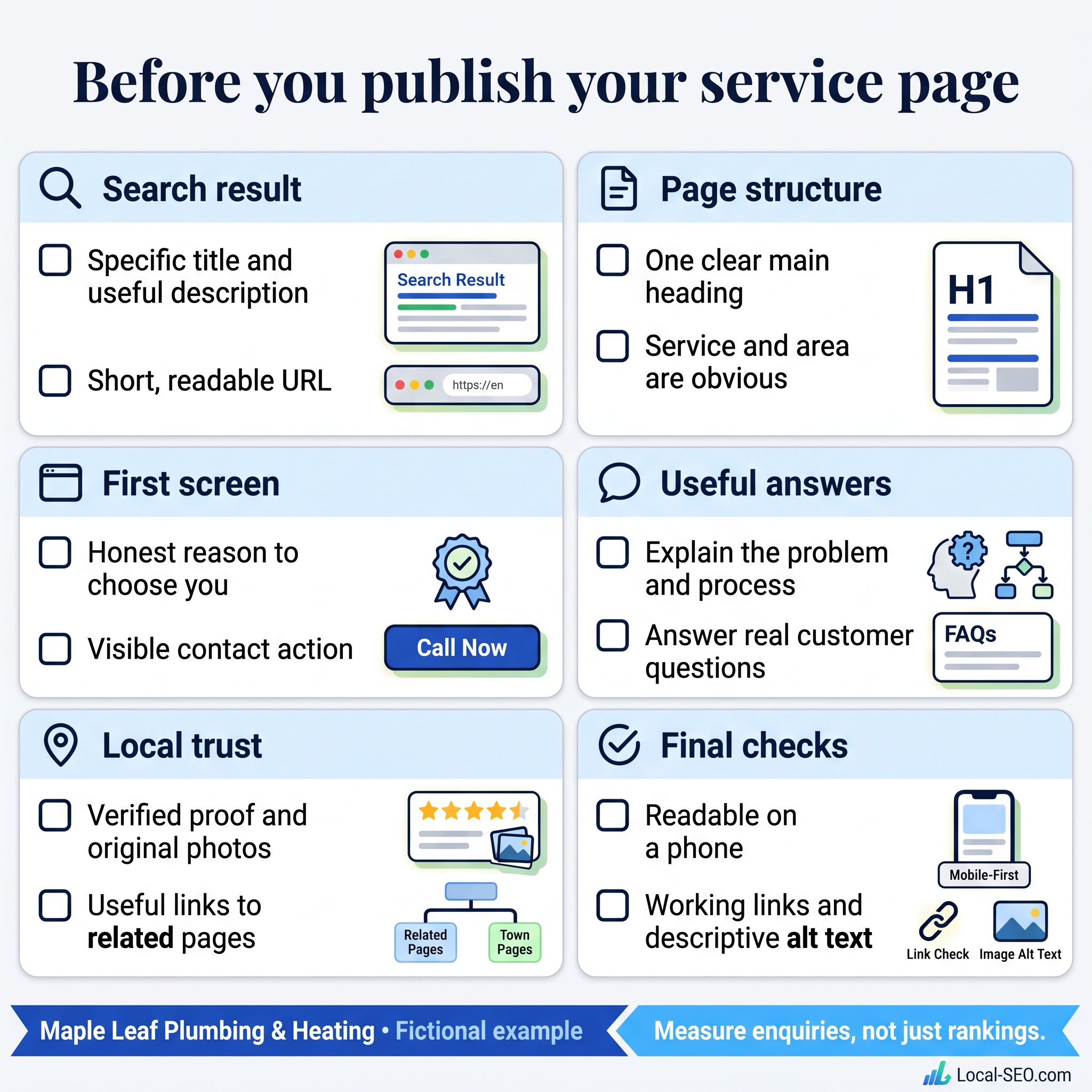
Subject and search result
- The page serves a distinct, genuine customer need.
- The title identifies the service naturally.
- The description is accurate and useful.
- The URL is readable, with redirects planned if an existing address changes.
- The main heading makes the service and area clear.
Copy and evidence
- The opening speaks to the customer's problem.
- The process matches what the business actually does.
- Prices, availability, credentials and guarantees are verified.
- Reviews and job examples are genuine and used appropriately.
- There are no unfilled placeholders, invented claims or copied competitor passages.
- FAQs answer real questions without repeating keywords mechanically.
Local information and links
- Service coverage is honest.
- No page implies an office that does not exist.
- Any area page adds useful information beyond a changed town name.
- Related pages are linked where the connection helps the visitor.
- Important pages are reachable through the site's navigation.
Phone, access and contact
- Text is readable without zooming.
- Controls have clear labels and usable tap targets.
- Keyboard focus remains visible.
- Persistent controls do not hide content.
- Images have appropriate alternative text. Decorative images can use empty alt text.
- Forms and telephone links reach the correct destination.
- Important content is available to search engines, without accidental blocking or a noindex instruction.
Write in plain language, but do not chase a universal third-grade reading score. Some services require precise terminology. Explain it rather than removing the information a customer needs.
There is no ideal word count either. Write enough to answer the decision-making questions, then remove repetition. A shorter complete page can be better than a longer padded one.
11. Measure whether the page is doing its job
Publishing is the start of the feedback loop.
Record the date of a substantial change. In Search Console, look at the page's impressions, clicks and queries over a meaningful period. Check whether the searches relate to the service and location you intended.
Track enquiries with suitable consent and privacy safeguards. Separate contact-button clicks from completed forms, answered calls and qualified jobs. A click is not automatically a lead, and a lead is not automatically revenue.
For local visibility, keep organic positions and Google Maps positions distinct. Maps results can vary by search location. Compare like-for-like checks rather than treating every position as the same measurement.
Do not attribute every change to new copy. Seasonality, competitors, reviews, technical changes and demand can affect results. Avoid declaring success or failure after a day or two, and do not promise a fixed timeline.
A useful review asks:
- Are the right searches finding the page?
- Are visitors taking the intended next step?
- Are the enquiries relevant to the service?
- Which questions are customers still asking?
- Has the page become inaccurate as the business changed?
Update the page when the evidence points to a genuine gap, not because a tool asks for more words.
Put this into practice on one page first
Choose one service that matters to the business. Gather the facts, write the page, verify every claim and test the enquiry path on a phone.
Then use the results to improve your next page. You will learn more from one clear, honest service page than from publishing dozens of interchangeable town pages.
Start with the to inspect an existing page. The checker can help identify on-page issues; it cannot confirm that business claims are true or guarantee better rankings. For more learning, browse the .
Sources and further reading
The recommendations above are editorial practices, not a list of guaranteed ranking factors. These official references explain the Google guidance behind the important distinctions:
- .
- .
- .
- .
- .
- .
- .
Written for Local-SEO.com. All Maple Leaf illustrations are fictional teaching examples. No real agency-client information is used.
About local-SEO.com Editorial Team
The local-SEO.com editorial team covers search and AI updates that affect local businesses and the agencies that serve them.
More articles
Have a story or tip? Write for us.