
Google Search Console Can Track Your Social Content
Google documents social platform properties for YouTube, TikTok, X and Instagram. What the gradual rollout means for local brands, and how to measure discovery without confusing clicks with leads.
By local-SEO.com Editorial Team · Published · 4 min read
Official source: Google Search Central (opens in a new tab)
Add your social account to Search Console
Illustrated steps, not a live Google screenStep 1 of 5
Search Console → Add property
Open Add property
In Search Console, open the property selector and choose Add property. The welcome screen is another starting point.
Google Search Console is no longer only a place to check your website. Google now documents platform properties for YouTube, TikTok, X and Instagram, letting eligible account owners see how people find their social content on Google.
The important qualification: access is rolling out gradually. These options may not appear in every account yet. This article was checked against Google's current help and Search Central guidance on October 20, 2026; that is our review date, not a claim that Google launched the feature today.
What has changed
Where the feature is available, you can add each supported social account or channel as its own Search Console property and verify ownership through Google's prompts. It is not a case of verifying instagram.com as if you owned the whole website.
The reports let you examine clicks, impressions, CTR, average position and the content or queries behind Google discovery. News and Discover reports appear only if the content receives traffic from those surfaces. A new property can take a few days to show data.
This is a separate setup from the December 2025 social-channel Insights experiment. That earlier announcement described channels Google automatically associated with a website. Google's newer platform-property guidance describes adding and verifying accounts individually.
Why local businesses should care
A customer does not always discover a business through its homepage. They might find a practical video, a photo explaining a finished job, or a short answer to a question they have been searching for.
For the fictional Maple Leaf Plumbing & Heating in Canton, that could mean a YouTube explanation of a noisy pipe, an Instagram photo showing what a tidy installation looks like, or a short clip explaining when a leak needs professional attention. Each has a different job, but the business name, accurate service area and next step should be recognisable across them.
That is the useful brand-building opportunity. Your website remains the place for detailed service information and enquiries, while social content can give people more ways to discover and evaluate you. You do not need to publish everywhere. Start with the channels you can maintain well.
This is not a promise of better Google Maps rankings. Adding a property is a measurement step. Social likes are not a guaranteed local ranking factor, and a Google click is not automatically a lead.
See what brings people to your content
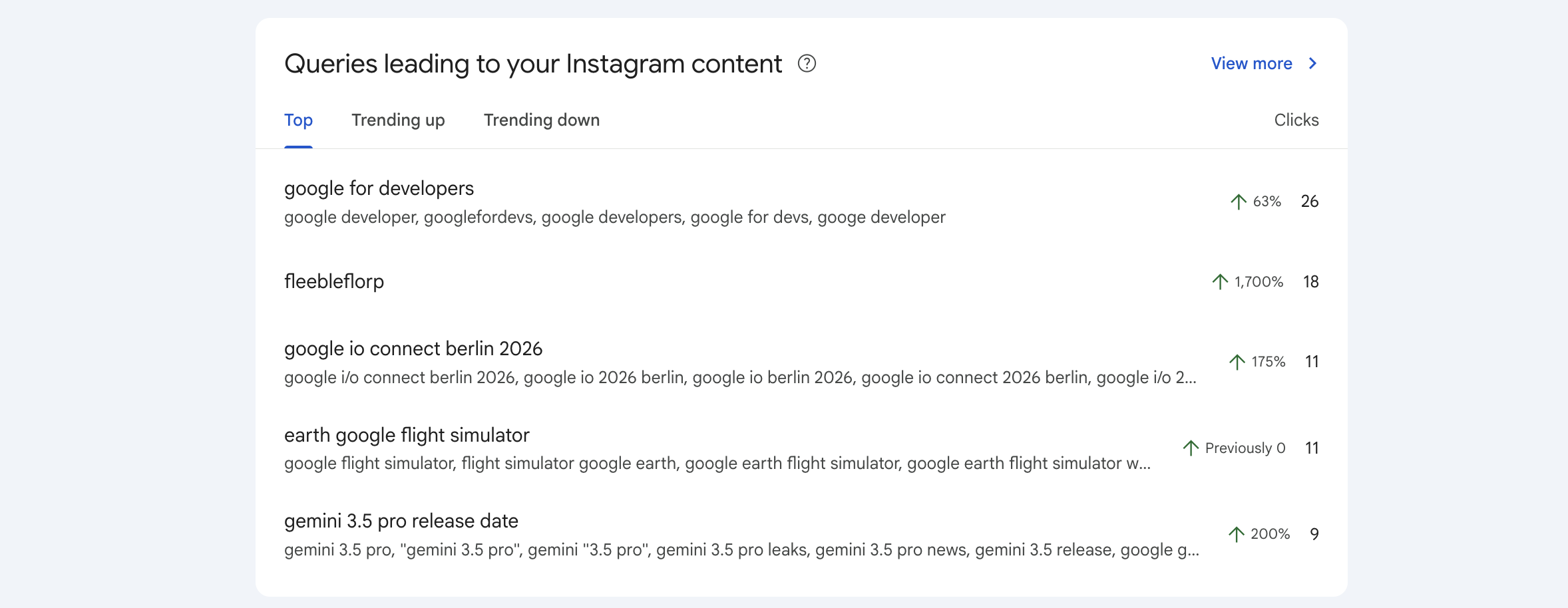
Screenshot: Google Search Central's published Instagram query-groups example, using Google's sample data. It is not a customer account or proof of access for your business. .
The interesting question is not simply which account gets the most impressions. It is which useful topics bring the right people closer to your business.
Look for questions related to genuine services. Compare equivalent periods and check the content URLs behind the numbers. A broadly popular how-to clip might build familiarity without generating local enquiries. A narrower service explanation might attract fewer clicks but fit your customers better. Measure that next step separately rather than guessing from Search Console.
What the numbers cannot tell you
Platform properties report Google discovery, not all activity inside the social app. Use the platform's own analytics for watch time, likes and in-app views.
A click may open a video in Google's viewer instead of sending someone to your website. Impressions are not unique people. Average position is not a city-specific Maps rank. Missing rows are not necessarily zero demand.
Website analytics, tagged links where supported, and enquiry records help you assess what happens after discovery. Keep these measures separate so you do not count the same person twice or label every click a booked job.
Give your content a route back to the brand
Publish something useful first. Show the work, answer a real question or explain the service clearly. Then offer a relevant next step: a fuller explanation, a service page, or a way to contact you.
Use truthful descriptions, consistent branding and links that actually work on the platform. Avoid town-name stuffing, bought engagement and invented customer stories. Get permission before sharing identifiable job photos or customer details.
Set it up with our free six-lesson guide
.
The guide covers supported accounts, ownership verification, what to do when the options are missing, how to read the reports, and a practical local-content routine. It includes Google's reference screenshots, a labelled setup walkthrough and a quiz with a shareable badge. No paid scan is launched by reading the guide.
Sources
Start the free social Search Console guide
About local-SEO.com Editorial Team
The local-SEO.com editorial team covers search and AI updates that affect local businesses and the agencies that serve them.
Have a story or tip? Write for us.